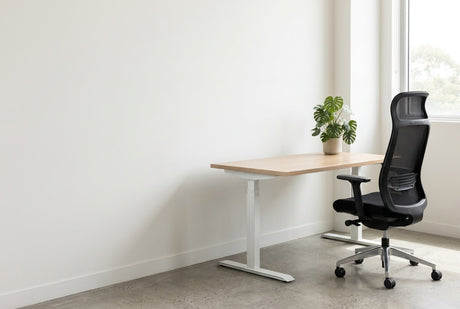
The spare room still has a bed in it. Or the only free wall in your apartment sits between the balcony door and the hallway, and it measures 1.3 metres. A small home office works when every piece earns its floor space. That means a desk sized to the wall, a chair that adjusts to you, and storage that rolls under or climbs up.
This guide covers measuring, compact desk sizes, sit-stand options, chairs, storage, light and noise, using real sizes and prices from our home office desks range.
Measure the home office space first
Measure the clear wall width between obstacles, not the whole wall. Note window sills, power points, heaters and the swing of the door. A desk that blocks the only power point means a lead across the floor.
Then measure into the room. Allow the desk depth plus roughly a metre behind it, so you can pull the chair out and stand up. In a bedroom, check the gap to the bed and the robe doors. Mark the outline with masking tape and live with it for a day. It is the cheapest way to learn that a 1500mm desk is 300mm too long.
Compact desk widths and depths that fit
Width decides what fits on the wall. Depth decides how far the desk eats into the room. For most small spaces, 600mm deep is the sweet spot: enough for a laptop or one monitor and a keyboard, without crowding the walkway.
The Rapid Worker Desk (from $144) starts small. It comes in 900W x 600D and 1200W x 600D, then 1500W x 750D, 1800W x 750D and 1800W x 900D, all 730mm high. The 25mm top sits on 18mm sides with side bolts for rigidity, and cable entry holes are standard.

Prices run from $144 to $270 across the sizes and colours: Beech, Oak or White, each over an Ironstone base. Use the table as a starting point, then check it against your taped outline.
| Space | Clear wall | Desk (W x D) | Handles |
|---|---|---|---|
| Hallway nook | About 1000mm | 900 x 600mm | Laptop, or laptop plus one screen on an arm |
| Bedroom corner | About 1300mm | 1200 x 600mm | One monitor, keyboard and notepad |
| Spare room wall | About 1600mm | 1500 x 750mm | Two screens and some paperwork |
| Dedicated study | About 1900mm | 1800 x 750 or 1800 x 900mm | Two screens, printer and files |
| Part-time standing | About 600mm | 600 x 600mm mobile top | A laptop at standing height |
If the room has a clear corner but no long wall, a corner desk can use space a straight desk leaves empty. In most small rooms, though, a straight desk is easier to fit around doors and windows.
Sit-stand options without a second big desk
A full sit-stand desk makes sense when you have the wall for one. In a nook, the other route is a small mobile desk you stand at for part of the day.
The Helsinki Mobile Height Adjustable Desk ($600) has a 600 x 600mm gloss white top on a gas lift, adjusting from 690mm to 1055mm. It rolls on four castors, two lockable, and is designed to fit under most desks. It is rated to 40kg with a 10 year warranty.
The trade-off is plain: this is a laptop standing station, not a home for two monitors. If you want both screens to rise with you, measure for a full sit-stand desk instead. At its lowest it sits at 690mm, so check the clearance under your own desk before planning to park it there.
A chair that adjusts properly, in a small footprint
In a small room you sit closer to a wall with less room to shift, so the chair has to fit your body. Look for seat height, seat depth, lumbar and arm adjustment, and compare these across our ergonomic task chairs.
The Chelsea Ergo Task ($208) covers those basics at a modest price. Its synchronised mechanism has seat slide, tension control and a 4-position multi-lock, and the lumbar adjusts over 100mm. Seat height runs from 430mm to 530mm, and it is rated to 120kg with a 5-year warranty.

Its overall footprint is 660mm by 660mm, worth adding to your taped outline. Slide the seat so its front edge sits a few fingers behind your knees. Set the height so your elbows are level with the desktop, and add a footrest if your feet lose the floor. Then set the screen so its top sits at or slightly below eye level, about an arm's length away.
Storage and cables: build up and roll under
Three moves free the most space: lift the screen, roll the drawers under and take the books up the wall.
A monitor arm lets you push the screen back or pull it close, which matters most on a 600mm-deep top. The Core Single Gas Spring Monitor Arm ($116) holds one 17" to 30" screen weighing 2kg to 9kg. It suits 75 x 75mm and 100 x 100mm VESA holes and includes clamp and grommet fixings. Our guide on choosing a monitor arm explains VESA sizes and mounting.
A slimline pedestal leaves more leg room than a standard one. The GO Steel Slimline Mobile Pedestal ($197) is 300mm wide, 472mm deep and 610mm high, so it sits under a 730mm-high, 600mm-deep desk. It takes foolscap files back to front, has master key locking and a 100kg weight rating.

For timber looks or more drawers, browse our pedestals and drawer units. Above the desk, a narrow bookcase or wall shelf holds files and books without taking more floor. Run leads through the desk's cable holes, fix a power board under the desk and bundle the rest with hook-and-loop ties.
Light, noise and the Australian home office
In winter the sun sits lower in the northern sky, so a north-facing window can throw light straight onto a screen. Place the desk side-on to the window and use blinds to cut glare. A window behind the screen makes you squint, and one behind you puts glare on it.
Apartments bring noise through shared walls. A rug, curtains and a closed door absorb more than you might expect, and the rug protects timber floors from castors. Avoid a wall shared with a lift if you can, and never box a heater in behind a desk.
If you work from home for an employer, Safe Work Australia's guidance says work health and safety duties still apply at home. It publishes a working-from-home checklist and a workstation set-up infographic, both worth reading before you buy.
Goods are delivered to the ground-floor entrance and arrive flat-packed unless the product page says assembled, as the GO Steel pedestal's does. In an apartment, check lift access before the boxes arrive.
Small home office — frequently asked questions
What size desk do I need for a small home office?
For a laptop and one monitor, 1200mm wide by 600mm deep is usually enough. A 900 x 600mm desk suits a laptop in a nook, and 1500mm or wider suits two screens.
How deep should a home office desk be?
About 600mm is the practical minimum for a monitor and keyboard. A monitor arm lets you push the screen further back. Choose 750mm for two screens or paperwork in front of them.
Is a mobile standing desk worth it in a small space?
Yes, if you mainly want to stand with a laptop for part of the day. With a 40kg rating and a 600 x 600mm top, the Helsinki suits a laptop rather than a dual-monitor set-up.
Can I put a monitor arm on a small desk?
Yes, and a small desk is where an arm helps most. A clamp grips the back edge of the desktop, so leave a small gap between the desk and the wall.
Shop the range
Start with our home office desks, then add a chair from our ergonomic task chairs and a slim unit from our pedestals and drawer units. For a compact first desk, the Rapid Worker Desk starts with 900mm and 1200mm widths. Metro delivery is a flat $75 per order, and prices include GST.